Advance Help Center Advance Help Center
  • Getting Started
    • User Onboarding Quick Steps
  • Reviews
    • Reviews Overview
    • Reviews List View
    • Reviews Automation
    • Reviews to Write- Bookings List View
    • Reviews Dashboard
    • AI Review Insights Overview
  • Integrations
    • Zapier Integration
      • How to create Zap using AdvanceCM Autopilot feature?
      • AdvanceCM Integration with Zapier
    • Connecting ChargeAutomation to AdvanceCM
    • Connecting Check-in Scan to AdvanceCM
    • Connecting Chekin to AdvanceCM
    • Connecting Touch Stay to AdvanceCM
    • Connecting KeyNinja to AdvanceCM
    • Connecting E-Visitor to AdvanceCM
    • Connecting Operto to AdvanceCM
    • Connecting Lula.Cleaning to AdvanceCM
    • Connecting Jervis Systems to AdvanceCM
    • Connecting Cleanster.com to AdvanceCM
    • Connecting MovingLake to AdvanceCM
    • Connecting Opiniion to AdvanceCM
    • Connecting Doinn to AdvanceCM
    • Connecting PriceLabs to AdvanceCM
    • Connecting Truvi to AdvanceCM
    • Connecting Turbosuite to AdvanceCM
    • Connecting Paraspot to AdvanceCM
    • Connecting Slack to AdvanceCM
    • Connecting Aipex to AdvanceCM
    • Integrations Overview
    • Connecting InsuraGuest to AdvanceCM
    • Connecting Minut to AdvanceCM
    • Connecting Duve to AdvanceCM
    • How do I connect to MailChimp?
    • Connecting Dropbox to AdvanceCM
    • Connecting Yada to AdvanceCM
    • Connecting Operto Teams to AdvanceCM
    • Connecting Wheelhouse to AdvanceCM
    • Connecting Boostly to AdvanceCM
    • How does the Mailchimp integration work?
    • Connecting Turno to AdvanceCM
    • Connecting Alertify to AdvanceCM
    • Connecting GuestFlow to AdvanceCM
    • Connecting StayFi to AdvanceCM
    • Connecting Safely to AdvanceCM
    • Connecting HKeeper to AdvanceCM
    • Connecting Beyond to AdvanceCM
    • Quickbooks integration with AdvanceCM
    • BetterSTR Integration with AdvanceCM
    • Get Clearing integration with AdvanceCM
    • Trustd Integration with AdvanceCM
  • User Settings & Logins
    • Account Info Preferences
    • User Type and Permissions Overview
    • User Settings Overview
    • Multi-Factor Authentication (MFA) Overview
    • Account Info Overview
    • Reset Password
    • Adding Payment Gateways using MFA
  • Rental Settings
    • Multi Unit rental relationship
      • What is difference between Main Unit Rental and Sub Unit Rental?
      • Major Differences between Multi-Unit Rental and Parent Child Rental Relationship
      • How does the Multi-Unit feature works?
    • How does the Parent Child Rental feature works?
    • How Do I Add and Update Rentals?
    • Rentals Overview
    • How Do I Create a Custom AdvanceCM Email Address?
    • Linking Rentals Together
    • How Do I Add Fees to my Rental?
    • How do I delete rentals?
    • How Do I Change My Rental Currency?
  • Calendars
    • Import External Calendar
    • Standard Calendar
    • Multi Calendar Overview
    • Hold Events Overview
    • Planning Calendar
    • Agenda Calendar
  • Inquiries and Bookings
    • How to Send Quotes
    • How Do I Delete an Inquiry
    • Messages Feed
    • Inquiry Inbox Overview
    • Inquiry Overview
    • Guests Overview
  • Widgets
    • Add the Interstitial Widget to a Site
    • Inquiry Widget Advanced Configuration
    • Search Widget Advanced Configuration
    • Add the Search Widget to a Site
    • Add the Calendar Widget to a site
    • Add the Booking Widget to a Site
    • Booking Widget Advanced Configuration
    • Add the Inquiry Widget to a site
  • Subscription & Billing
    • Billing Info Overview
  • Websites
    • Guest Portal Overview
    • Custom Domains With AdvanceCM Websites
    • Booking Engines
    • Custom Domains With AdvanceCM Guest Portal
    • Creating a website with Website Builder
    • Securing your Custom Domains
    • Website Analytics and Tracking
  • Operations
    • Tasks
      • My Tasks Overview
      • Tasks List View Overview
      • Tasks Calendar
    • Vendor Web Application
    • Vendor List View
    • Inventories Overview
    • Incidents Overview
  • FAQs
    • Multi-Unit Rentals Relationship FAQs
    • Parent- Child Rentals Relationship FAQs
    • Reviews FAQs
    • Advance Intelligence FAQs
    • General FAQs
    • Channels FAQs
    • Smart Devices FAQs
    • MFA FAQs
    • Automations/Autopilots FAQs
    • Messaging Apps FAQs
  • Autopilots
    • Tasks Autopilot Wizard Overview
    • Guest Autopilot Wizard Overview
    • Extras Autopilot Wizard Overview
    • Reviews Autopilot Wizard Overview
    • Rates Autopilot Wizard Overview
    • Messages Autopilot Wizard Overview
    • Inventories Autopilot Wizard
    • Expenses Autopilot Wizard Overview
    • Locks Autopilot Wizard Overview
    • Charges Autopilot Wizard Overview
    • Invoices Autopilot Wizard Overview
    • Autopilot Wizard Overview
    • Bookings Autopilot Wizard Overview
    • Documents Autopilot Wizard Overview
    • Credit Card Autopilot Wizard Overview
    • Incidents Autopilot Wizard Overview
  • Rate Management
    • My Rates are Too High on Booking.com
    • What is a Rate Category?
    • My Rates are Too Low on Booking.com
    • Pushing Rates to API Channels
    • How to Set Up Distinct Rates for Channels
    • How to Set Day-Specific Pricing
    • Changing the Max Guests value on Booking.com
    • What is a Dynamic Rate?
    • Changing the additional guest fee on Booking.com
    • What is a Standard Rate?
    • Rates Overview
    • Rate Determination Algorithm
    • Troubleshooting Rates
    • What is a Base Rate?
  • Settings
    • Payment Gateways
      • Booking.com and Expedia payment details
      • How to connect with Stripe Payment gateway?
      • How to connect with Peach Payment gateway
      • How to connect with Paypal Advance?
    • Data Feeds
    • Payments Overview
    • Data Feeds Overview
    • Payment Rules Overview
    • File Cabinets Overview
    • Email Options
    • Branding Info Overview
    • Shared Content Overview
    • Stealth Overview
    • AdvanceCM Data Dictionary
    • Custom Codes Overview
    • Templates Overview
    • Web onboarding Flow for AdvanceCM users
  • Smart Devices
    • Smart Devices Setup
    • Smart Devices General Settings
    • Smart Devices Overview
  • Channel Manager
    • iCal Connections
      • Connecting iCal Channels
      • Export your AdvanceCM calendar to Holidaylettings
      • Connecting to Flipkey/Tripadvisor with AdvanceCM
      • What if my channel is not listed in AdvanceCM?
      • Connecting to Homeaway/VRBO with AdvanceCM
    • Airbnb
      • How to apply 20% discount promotions in Airbnb Bookings
      • Airbnb Price Settings
      • How Do I Disconnect my Airbnb Listing or Account from AdvanceCM?
      • Airbnb Host Alteration
      • Airbnb Guest Alteration
      • Creating Listings in Airbnb
      • Requirements for an Airbnb Rental
      • Connecting to Airbnb API
      • Airbnb 2-way API Sync
      • Connecting to Airbnb via iCal
      • Airbnb Opportunities, Reviews & Notifications
      • How to Rank Higher on AirBnB
      • Airbnb API FAQ
      • How do I refresh my Airbnb property list?
      • Creating an AirBnB Password
      • Airbnb Booking Settings
    • Agoda
      • Connecting Agoda with AdvanceCM
    • Expedia
      • How to connect Expedia Messaging with AdvanceCM
      • Connecting Expedia with AdvanceCM
    • Rentals United
      • Connecting Rentals United to AdvanceCM
    • Tiket
      • Connecting Tiket to AdvanceCM
    • Google Vacation Rentals
      • Google Vacation Rentals FAQs
      • Connecting to Google's Vacation Rental platform
      • Google Vacation Homes - Fixing Rental Errors
    • Booking.com
      • How to edit listing for Booking.com inside ACM
      • How to add listing for Booking.com inside ACM
      • Connect to AdvanceCM via the Booking.com Extranet
      • Pushing rates to Booking.com
      • Booking.com Rates and Additional Guest Pricing
      • Sending Booking.com messages with AdvanceCM
      • AdvanceCM And Booking.com Best Practices
    • HVMI
      • Marriot Discounts
      • How Marriott handles Booking Fees
      • Connecting HVMI to AdvanceCM
      • HVMI Requirements and FAQ
    • VRBO
      • VRBO Bed Syncing
      • Setting Rates and Fees in AdvanceCM for Vrbo
      • VRBO FAQs
      • Activating AdvanceCM Rentals on VRBO
      • Connecting Vrbo to AdvanceCM
    • Trip.com
      • Connecting Trip.com to AdvanceCM
    • Holidu
      • Holidu API Requirements and FAQ
      • Connecting Holidu to AdvanceCM
    • Channels Overview
    • Adding Custom Channels
    • Adding Commissions for Channels
    • How to connect Hopper Channel with AdvanceCM?
  • Documents
    • Documents Templates
    • How to create Documents?
    • Documents Preferences
  • Finances
    • Expenses
      • Importing Expenses
      • Expenses Overview
      • Expense Settings
    • Invoices
      • Invoice Overview
      • Invoice Templates
    • Charges Overview
    • Extras Overview
    • Booking Formula Overview
    • Discounts Overview
    • How to setup Security Deposits?
  • Messaging Apps
    • Messaging Apps Logs Overview
    • AdvanceCM Unified Inbox
    • Messaging App- Gmail
    • Messaging App - WhatsApp
    • Messaging App- SMS
    • Messaging App - Facebook
    • Messaging App -Instagram
    • How to add Custom Phone Number?
  • Advance Intelligence
    • AI generated Incidents & Task Approval Workflow
    • AI based Search
    • AI driven Actions
    • Activating Advance Intelligence
    • Advance Intelligence Rental Information
    • Advance Intelligence Credit Recharge
    • Advance Intelligence Ignore List
    • Advance Intelligence Settings
    • Advance Intelligence Introduction & Benefits
    • Advance Intelligence Knowledgebase
    • AI Scheduling Feature
  • Overview
    • AdvanceCM Multi Language Support
    • Push Rates & Availability
    • Dashboard Overview
    • Inventory Search Overview
    • Cost Estimator Overview
  • Automations
    • Rates Automation
      • LOS Discount Automation
      • Group Rates
      • Gap Night Automation
      • Last Minute Automations
      • Channel Adjustments
      • Discount Codes Automation Overview
      • Rates Automation Overview
      • Min Night Stay Automation
    • Expense Automation
    • Documents Automation
    • Task Automation
    • Time Based Triggers
    • Invoice Automations
    • Booking Automation Overview
    • Automations Overview
    • Message Automation Overview
  • AdvanceCM Mobile App
    • AdvanceCM Mobile App: Discounts Module
    • Onboarding flow in Mobile App
    • AdvanceCM Mobile App: Rentals Module
    • AdvanceCM Mobile App: Inquiries Module
    • AdvanceCM Mobile App: Inventories Module
    • AdvanceCM Mobile App: Extras Module
    • AdvanceCM Mobile App: Invoices Module
    • AdvanceCM Mobile App: Tasks Module
    • AdvanceCM Mobile App: Vendors Module
    • AdvanceCM Mobile App: Charges Module
    • AdvanceCM Mobile App: Incidents Module
    • AdvanceCM Mobile App: Expenses Module
    • AdvanceCM Mobile App: Calendars Module
    • AdvanceCM Mobile App: Dashboard
    • AdvanceCM Mobile App: Messages Module
    • AdvanceCM Mobile App: Guests Module
    • AdvanceCM Mobile App: Autopilot Module
  • Power Reporting
    • Power Reporting Dashboard/Control Center
    • Power Reporting: Average Booking Length
    • Power Reporting Revenue Report
    • Power Reporting: Nights Created
    • Power Reporting: Nights Filled Report
    • Power Reporting: Channel Nights
    • Power Reporting: Advance Booking Days
    • Power Reporting: Occupancy Rates Report
    • Power Reporting: Bookings Created
    • Power Reporting: Invoices
    • Power Reporting: Bookings Cancelled
    • Power Reporting: Average Price Per Night Report
    • Power Reporting: Recipients
    • Power Reporting: Channel Revenue Report
    • Power Reporting: Nights Cancelled
    • Power Reporting: Money Paid Over Time
    • Power Reporting: Commission Strategies
    • Power Reporting FAQs
    • Power Reporting: Nights Booked Ahead
    • Power Reporting: Average Booking Price Report
    • Power Reporting: Scheduled Statements
    • Power Reporting: Revenue Generated Report
    • Power Reporting: Statements
    • Power Reporting: Guests Hosted Report
    • Power Reporting: Payments
FAQs / Advance Intelligence FAQs /
Website Login

Advance Intelligence FAQs

Is Advance Intelligence accessible for Trial Users?

No, this feature is not accessible for Trial users. You have to subscribe to use it from the AppStore.

Is Advance Intelligence Guest messaging Paid or Free?

This is a paid feature with a charge of $0.02 for each generated AI message.

Does the Advance Intelligence feature offer any Trials?

We offer 100 Free credits for each new subscription.

Is the Advance Intelligence feature a fixed amount price structure or variable?

The Advance Intelligence pricing structure is variable as you will be charged for each generated AI message. The price structure is credit-based, users will top up their account and Advance Intelligence will charge users from that balance. For example you add a credit of $100 - for each generated message, $0.02 will be deducted from the balance of that $100.

Can I top up a custom amount to use for Advance Intelligence?

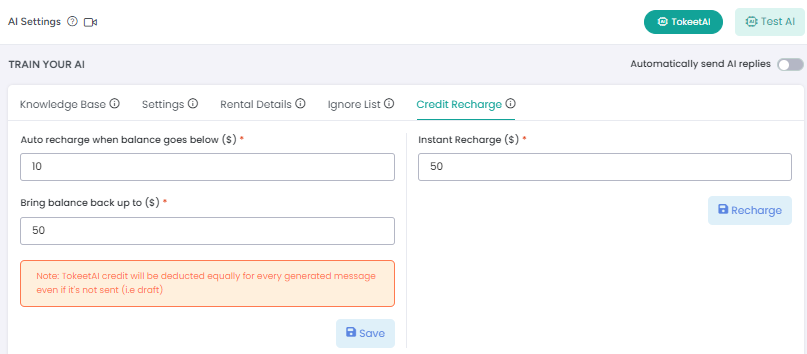
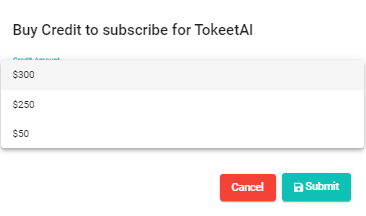
Yes, you can add a custom amount under the Advance Intelligence settings, but at the time of subscription you have only three options available to choose from to apply a credit.
How do I add credit for Advance Intelligence?

First Time -
You cannot add credit directly, first time credit will be added at the time of subscription, based on the total you select, then your balance will be auto recharged if your balance goes below a certain limit using the Advance Intelligence settings under the  “Auto credit recharge” tab. Also, you can recharge manually as shown in the screenshot below.

What if I don’t use all of my credit?

Unused credit for Advance Intelligence is rolled over to the next month for you to use.

Will I be alerted once I’ve used all of my Advance Intelligence credit?

While specific alerts are not yet available, you will receive an error message prompting you to top up before generating any AI-based responses.

Is Advance Intelligence going to charge per generated message OR per sent message?

Advance Intelligence will charge users per generated message, whether or not you send that message to a guest.

Can I control how messages are generated or how often?

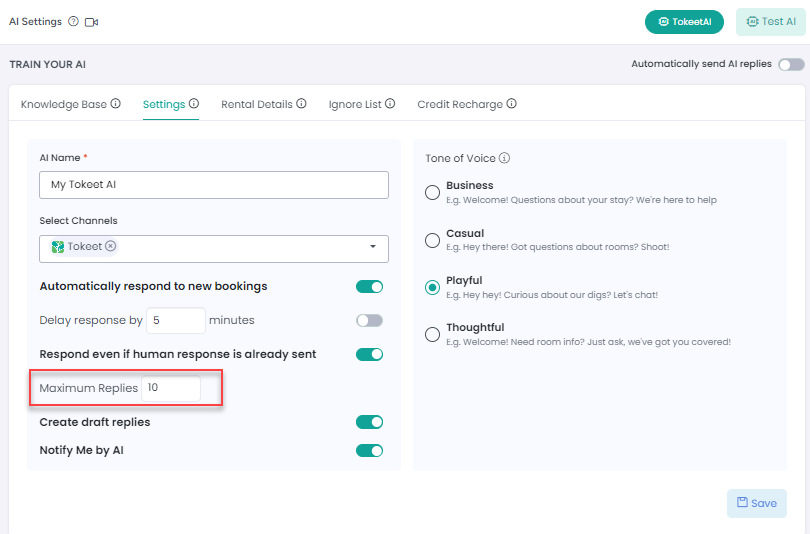
You can control the total number of AI based messages generated for each conversation by adjusting the “Maximum Replies” option under the Advance Intelligence settings.

Are we going to be charged for the "TestAI" button usage?

Yes, you will be charged to use this button for testing the AI responses as this counts as a generated response.

Is the Advance Intelligence feature accessible by each user role?

This feature is available for all user roles who have access to the Inquiries inbox.

Can I have a demo or training session for Advance Intelligence?

Yes, to book a demo where you’ll be able to see how Advance Intelligence functions and ask questions, please schedule a call using the link here. 

How do I start using Advance Intelligence?

You will need to subscribe to Advance Intelligence from the Tokeet AppStore to start using the feature. See more on subscribing and payments in our article here.

As always, we're here to help. Please feel free to email us with any questions.


How did we do? Thank you! We appreciate your feedback.
Website Login
Copyright © 2026 advance.cm. All Rights Reserved.
No documents match your search.
Searching...