Managing Check-in and Check-out Restrictions
AdvanceCM allows you to control when guests can check in or check out by applying restrictions based on specific dates, days of the week, and distribution channels. This is useful for managing operational schedules, cleaning availability, peak seasons, and channel-specific booking rules.
What Can Be Configured?
You can create restrictions to:
Block check-ins during a specific date range.
Block check-outs during a specific date range.
Allow check-ins or check-outs only on selected days of the week.
Apply different rules to different channels (Airbnb, Booking.com, VRBO, Direct Website, etc.).
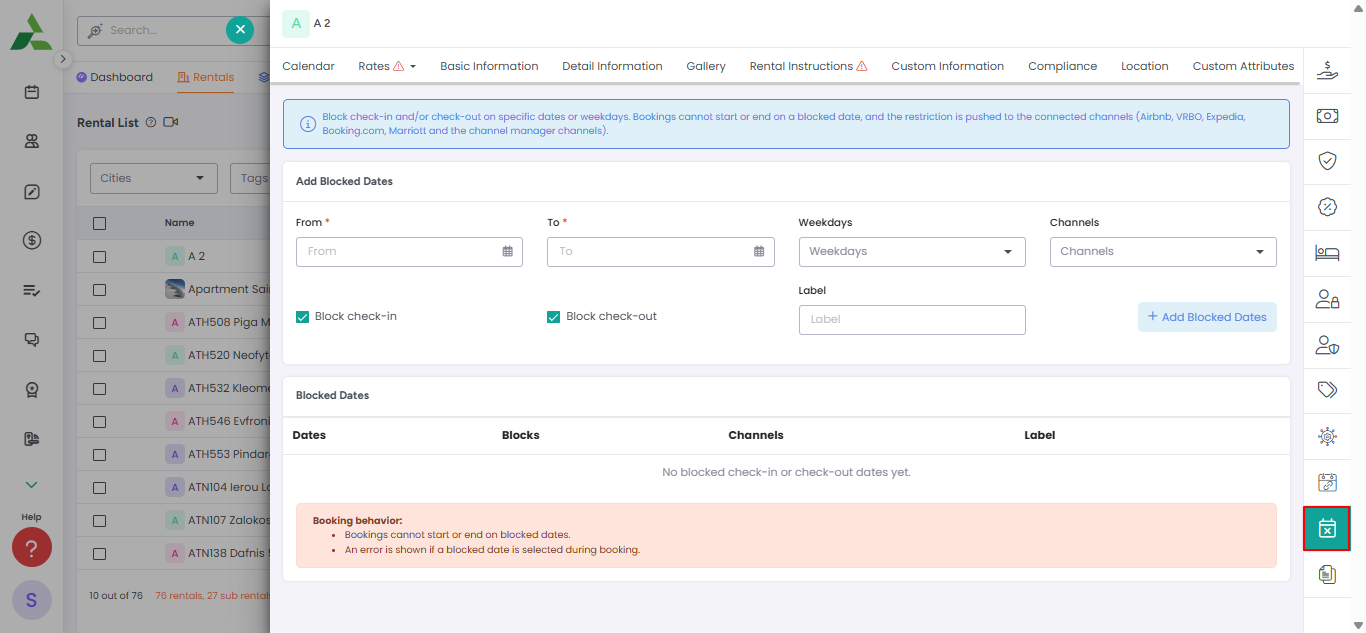
You can find it under rentals detail overlay in right side menu options as mentioned in below screenshot
Examples
Example 1: Block Check-ins During a Holiday Period
You may want to prevent guests from arriving during a maintenance period.
Configuration:
Restriction Type: No Check-in
Date Range: December 24 – December 26
Channels: All Channels
Guests can still stay during these dates if their booking starts before the restriction period, but new arrivals will not be allowed.
Example 2: Weekend Check-ins Only
A property manager wants guests to arrive only on Fridays and Saturdays.
Configuration:
Allowed Check-in Days: Friday, Saturday
Channels: Airbnb, Booking.com, Direct Website
Guests searching for arrivals on other days will see the property as unavailable.
Example 3: Different Rules per Channel
You may want stricter rules on one OTA while allowing more flexibility on direct bookings.
Configuration:
Channel | Check-in Rule | Check-out Rule |
|---|---|---|
Airbnb | Friday & Saturday only | Any day |
Any day | Any day | |
Direct Website | Friday, Saturday, Sunday | Any day |

Common Use Cases
Prevent same-day arrivals during busy periods.
Restrict arrivals on Mondays or Tuesdays.
Create Saturday-to-Saturday stays for vacation homes.
Block check-outs during maintenance periods.
Apply stricter rules to OTAs while keeping direct bookings flexible.
Notes
Restrictions only affect future bookings.
Existing reservations are not modified.
Changes may take a few minutes to sync with connected channels because after restriction is added it will go to channel side after availability is synced.